 Itemlume
PRODUCT CREATIVE / PRODUCTION AND HANDOFF
Why does my trimmed product-ad shot keep extra frames or start at a nonzero timestamp?
Two separate behaviors can explain it: trim keeps the original timestamps, and multiple start/end conditions inside one trim are greedy rather than an automatic intersection. Check which frames survived before rebasing them with setpts=PTS-STARTPTS. A zero starting timestamp alone does not prove that the intended frames were selected.
Separate frame selection from the playback clock
A time-based trim reads frame timestamps. The start_frame and end_frame options instead count frames passing through that filter. The end boundary identifies the first frame to discard. With variable-rate material, a frame number is not interchangeable with a time calculated from a nominal frame-rate label.
The retained frames keep their timestamps. This matters when preparing separate shots for a concat filter, whose documented requirement is that segments start at zero. Apply rebasing after selecting the intended content, and inspect the audio path separately rather than assuming a video filter retimed narration too.
Executed boundary comparison
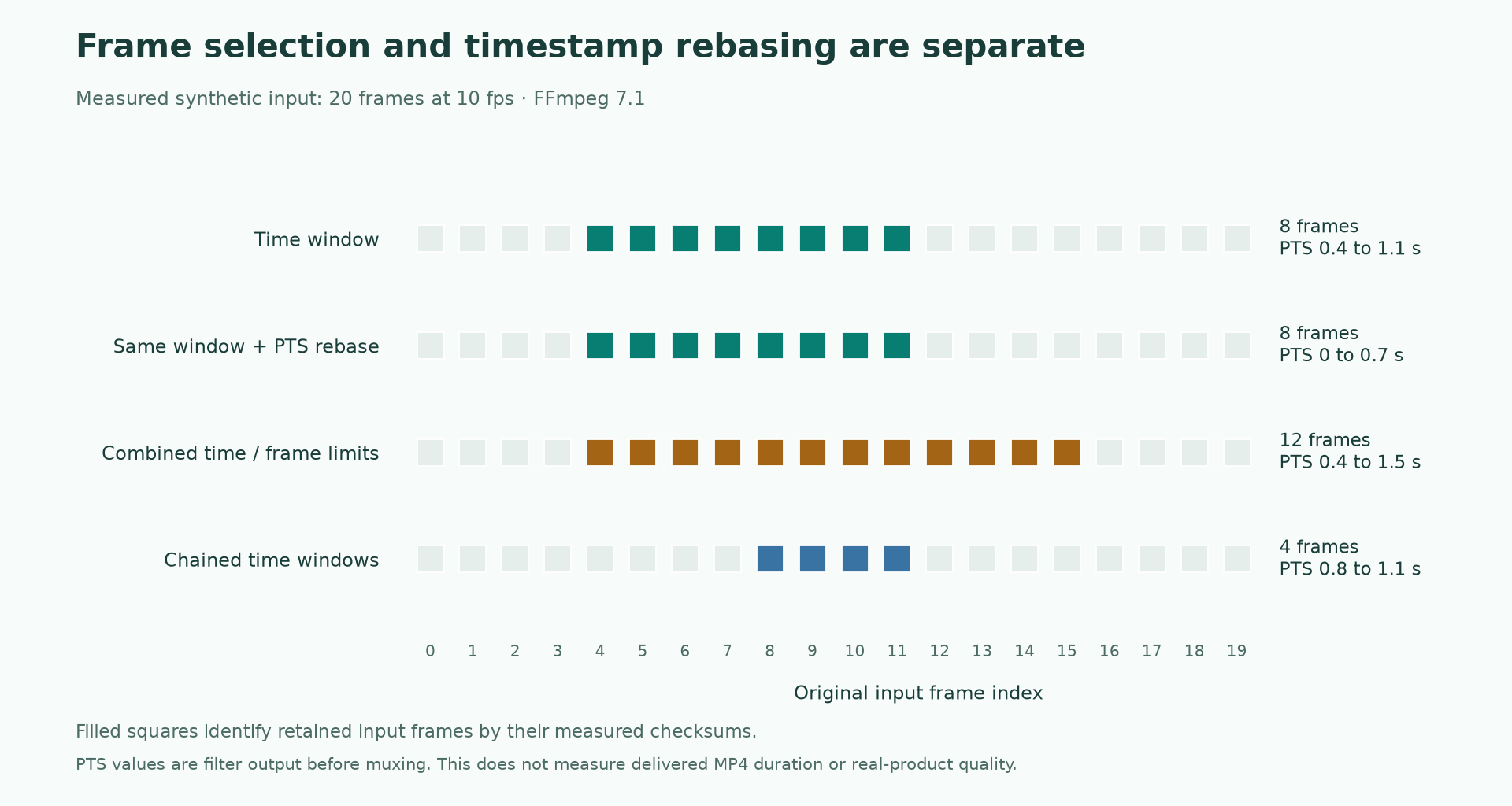
We generated a two-second testsrc2 sequence at 10 frames per second, with 20 frames. FFmpeg 7.1 showinfo logged each output frame before muxing. A trim from 0.4 to 1.2 seconds retained input frames 4 through 11: eight frames, with timestamps from 0.4 through 1.1 seconds. Adding setpts=PTS-STARTPTS kept those same input-frame checksums while changing the first timestamp to zero.
A single trim with start=0.4, start_frame=8, end=1.2 and end_frame=16 retained frames 4 through 15, not the narrower overlap a reviewer might expect. By contrast, chaining a 0.4–1.2 time trim with a 0.8–1.6 time trim retained frames 8 through 11. These measurements apply to this synthetic constant-rate input, not every file or command placement.
| Executed case | Frames retained | First filter PTS | Last filter PTS |
|---|---|---|---|
| trim=start=0.4:end=1.2 | 8 | 0.4 | 1.1 |
| trim=start=0.4:end=1.2,setpts=PTS-STARTPTS | 8 | 0 | 0.7 |
| trim=start=0.4:start_frame=8:end=1.2:end_frame=16 | 12 | 0.4 | 1.5 |
| trim=start=0.4:end=1.2,trim=start=0.8:end=1.6 | 4 | 0.8 | 1.1 |
Choose the condition you actually mean
Illustrative exercise: shot A needs only the interval in which a product label is fully readable. Shot B must satisfy both a first timing window and a stricter approved-action window. For A, record a single time range and inspect its first and last retained frames. For B, express the intersection deliberately, such as chained time trims, rather than adding unrelated time and frame-count limits to one filter.
If a chosen range includes an unapproved product state, changing its starting PTS will not remove that state. Return to content selection first. Conversely, if the correct states survived but a following concat operation expects zero-based segments, preserve the selection and adjust its timestamp origin.
Accept the assembled file separately
Record the source identity, filter order, first and last approved frame, and timing policy. Treat the final container’s start time, duration, video cadence and audio synchronization as additional checks. Our null-output measurements deliberately exclude muxer or encoder behavior and do not establish a delivered MP4 duration.
Keep the original clip and the approved review range. If the final file has extra content, identify whether it entered during selection, rebasing or later output processing before paying to regenerate a product shot.
Inspect the actual measurement data
These data describe the synthetic checks scoped in the article, not real-product, publishing-platform or subjective-quality acceptance.
- synthetic-video-filter-measurements.csv · SHA256 2d8619cda22dc3ba1219061ade31f1132d6f67a9b6cf81efbe7986396221220a
Illustrative exercise — approved interval and clock origin
These are illustrative exercise rows. Save a copy and record your own observations; the example is not an executed acceptance test.
| Shot | Content condition | Selection approach | Timestamp check | Acceptance |
|---|---|---|---|---|
| A: Readable label interval | One approved time range | Single time trim | Rebase only after retained frames pass | First and last product states approved |
| B: Demonstration sub-window | Two timing conditions must both hold | Deliberately intersect through chained time trims | Check zero-based start for concat | No extra action state outside the intersection |
Sources and further reading
Recorded source-review dates are listed individually below. An undated source does not inherit the article’s publication date. Software and platform rules can change; check the current original before acting.
- FFmpeg Filters: trim · Reviewed
- FFmpeg Filters: setpts, asetpts · Reviewed
- FFmpeg Filters: concat · Reviewed
Frequently asked questions
Does setpts=PTS-STARTPTS trim more frames?
It changes the timestamp origin. In the executed comparison, frame count and retained checksums stayed the same; content selection remained the job of trim.
Can I combine time and frame limits to require all conditions?
Not by assuming one trim intersects them. The documentation describes greedy combined constraints; use deliberately chained filters when you require simultaneous conditions and verify the resulting boundaries.
PREPARE ASSETS FOR YOUR NEXT STEP
Create supporting product assets in Itemlume.
Create new product creative assets in the workspace, then continue in your chosen tools. Third-party software procedures described in this guide take place in those applications; this workspace link does not imply an integration. Check current capabilities, account access and credit quotes.
Explore asset creation tools Check pricing and credits