 Itemlume
Logo studio / PUBLISHING WORKFLOW
Why does my vector logo still need embroidery digitization?
A vector logo describes artwork. Embroidery digitization describes how a machine will reproduce it with thread. Approve both, then check the physical result.
Identify which file your embroiderer actually needs
A fictional seller, Alder Goods, approves a leaf symbol for a tote and later sends the same SVG for a curved cap. The artwork is unchanged, but that does not establish that one production setup suits both products. Ask the selected supplier for the exact product, placement, finished dimensions, accepted artwork format and who prepares the machine file.
Printful explains digitization as conversion into a machine-readable stitch file. Its own-file policy says it prepares those files itself. That is Printful’s workflow, not a universal rule for every embroiderer. Confirm your supplier’s policy before paying an outside digitizer.
Approve adaptations as a separate artwork version
Give the digitizer the selected logo and an annotated list of features that define it: the leaf opening, name spelling and symbol-to-name relationship. Ask which details need adjustment for the chosen fabric and placement. Keep the ordinary brand master alongside an application-specific embroidery version; otherwise a simplified cap mark can accidentally replace the storefront logo.
Printful’s preparation guide describes embroidery-specific design constraints and adjustment approval. Our review method is to request a before-and-after comparison at the intended finished size. Approve each meaningful change explicitly. A proposed merged gap or removed tagline is a brand decision, even when it solves a manufacturing problem.
Review a sew-out on the intended product
For Alder Goods, commission a sample on the actual tote material and a separate cap sample if that application is planned. Inspect letter readability, open spaces, placement, edge shape and fabric puckering in ordinary viewing conditions. Compare the physical item with the approved adaptation rather than an enlarged screenshot of the original concept.
Record the artwork version, product, placement, supplier process-file reference and sample decision together. If the sample changes, ask the supplier which corresponding file was revised. Do not authorize a larger order from a thread simulation alone. This article supplies a review method, not measured stitch settings or a tested sample.
Keep concept, process file and proof visibly separate
Use Logo studio to explore the visual concept, then have a production designer and embroiderer prepare the appropriate deliverables. Itemlume does not digitize needle paths or operate an embroidery machine. Its generated image cannot establish thread density, production feasibility or sample quality.
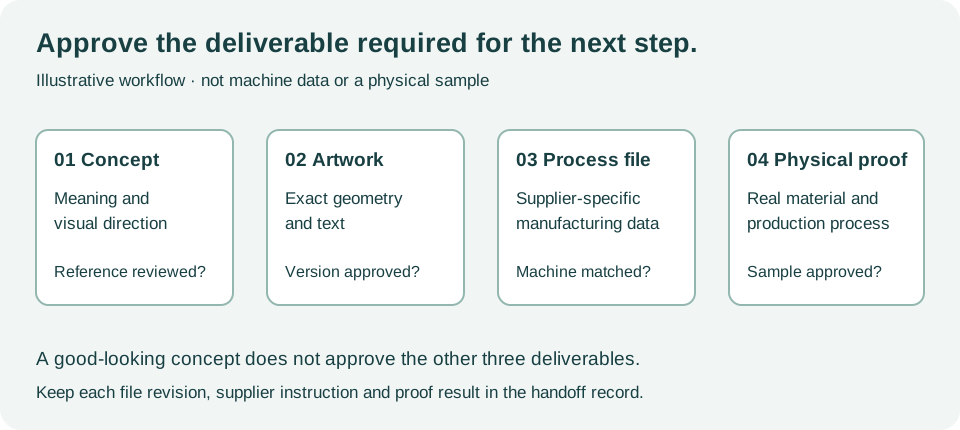
The original diagram illustrates approval stages; it is neither a machine file nor a photograph of an actual sew-out.
Use the production artwork handoff worksheet as a manual review record. Sample rows are fictional. It does not connect to, import into or modify an external store or production machine.
Sources and further reading
Sources for this page were checked on . Platform rules can change; verify the current source before publishing. Prompt examples and workflow recommendations are Itemlume editorial guidance, not independently measured results.
Frequently asked questions
Is an SVG already an embroidery file?
No. It can provide artwork for digitization; the supplier must confirm the machine-compatible process file and application.
Can the same logo work on a cap and a tote?
The same identity can be retained, but confirm each product, placement and supplier setup rather than assuming one stitch file transfers.
Does Itemlume provide a tested embroidery sample?
No. Obtain and inspect a physical sample from the supplier you intend to use.
BUILD FROM A PRODUCT YOU KNOW
Put this workflow into practice with your own product.
Explore the relevant tool first. AI copy and concept planning are free after sign-in. Image and video generation require available credits and the applicable account access.
Open Logo studio Check pricing and credits